

Our software runs on a wide range of operating systems.
A license is valid for the respective operating system and user, so it can be used on several of your devices with the same operating system without any problems (the license updates automatically when you switch computers/smartphones).
If you want to use devices with different operating systems, please buy the first App Store license on your main device and use the free “Restore” button in the “Buy/Restore License” dialog on the second device.
Alternatively, you can of course purchase the cross-platform license directly on our website in your customer account.
Let’s get started with the download…
PC (Microsoft / Windows):
Alternative: Download the Windows installer file in the 64-bit version directly from our website (for older computers: 32-bit version)
MAC (Apple / macOS):
For macOS 11.0 (and newer):
For macOS 10.x:
iPhone/iPad (Apple / iOS):
Various smartphones (Google / Android):
Alternative: Download the icTrainer APK file (32-bit) or icTrainer APK file (64-bit), e.g., for installation on Huawei HarmonyOS tablets via the Total Commander app
Fire Tablet (Amazon / FireOS):
Note: However, a license must be purchased on a second device (Android, iOS, or Windows). Activation on the Fire tablet is then free via the RESTORE button in the software.
Linux:
We do not currently offer a dedicated Linux version.
Although one is in preparation, our development environment unfortunately does not currently support BluetoothLE for Linux. Depending on the distribution, this operating system also lacks touch functionality.
However, we know of users who have successfully installed icTrainer using Oracle Virtualbox 7.0 on MX Linux (based on Debian 12 – bookworm). In this case, Windows 10 was the guest operating system.
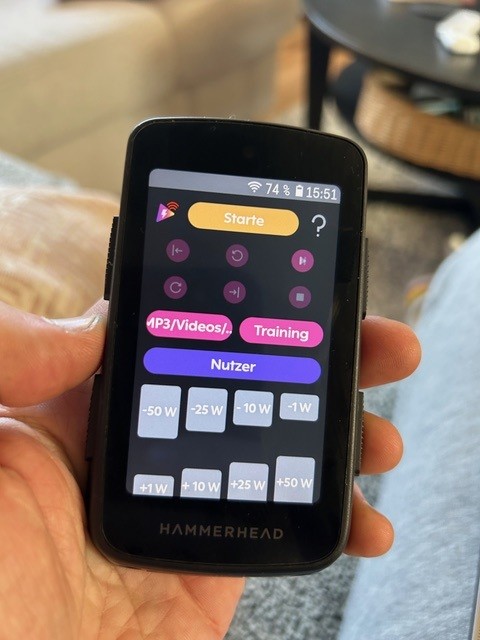
icTrainer Remote Control
This allows you to remotely control your already downloaded and installed icTrainer software via smartphone (watch demo).
Pro tip: Some of our customers also use the icTrainer APK file (64-bit) to install the remote control on their Hammerhead Karoo 3.